
product
Inbox forwarding, alias proxy, and routing rules
Choose the right inbox control for each job: forwarding for destination delivery, aliases for identity masking, and rulesets for policy enforcement.
Use this guide to choose the right MailSlurp inbox control for each job: forwarding for delivery, aliases for identity masking, and rulesets for policy enforcement.
If you are designing the full routing pipeline, start with Email routing automation. If you need to decide what to use in a specific step, use the framework below.
Mechanism map
| Mechanism | Use it when | Avoid it when |
|---|---|---|
| Inbox forwarder | You need to redirect inbound mail to a destination inbox or operational address | You need strict policy enforcement before delivery |
| Alias proxy | You need to mask identities while preserving two-way communication | You need full content-based routing logic |
| Routing ruleset | You need block/allow controls and deterministic policy checks | You only need simple redirection |
Decision questions
Before choosing a mechanism, answer these in order:
- Does this step decide who should receive the message?
- Does this step protect identity privacy?
- Does this step enforce risk or compliance policy?
- Do you need all three in one flow?
Most mature pipelines use more than one mechanism, but each mechanism should own one responsibility.
Forwarders: destination control

const forwarding: CreateInboxForwarderOptions = {
  field: CreateInboxForwarderOptionsFieldEnum.SUBJECT,
  match: "*@bigcompany.com",
  forwardToRecipients: ["sales@mycompany.com"],
};
Use forwarders for escalation lanes and operational handoff:
- support mailbox to ticketing intake
- billing mailbox to finance queue
- security mailbox to incident channel
See the forwarding guide.
Alias proxy: identity boundary
Alias proxy routes messages through masked addresses so the original sender and recipient stay hidden.

/**
 * Example of using an email alias to mask an address and forward emails to hidden address
 */
const {
  AliasControllerApi,
  InboxControllerApi,
  Configuration,
  WaitForControllerApi,
} = require("mailslurp-client");

// setup mailslurp config
const config = new Configuration({ apiKey });

// create controllers
const inboxControllerApi = new InboxControllerApi(config);
const aliasControllerApi = new AliasControllerApi(config);
const waitForController = new WaitForControllerApi(config);

// create two different email addresses for testing
const inboxA = await inboxControllerApi.createInbox({ name: "inboxA" });
const inboxB = await inboxControllerApi.createInbox({ name: "inboxB" });
const emailAddressA = inboxA.emailAddress!!;
const emailAddressB = inboxB.emailAddress!!;

// create an alias
const alias = await aliasControllerApi.createAlias({
  createAliasOptions: {
    emailAddress: emailAddressA,
    useThreads: true,
  },
});
// emailAddressA has been masked by a new email address that was created by the alias
expect(alias.maskedEmailAddress).toEqual(emailAddressA);
expect(alias.emailAddress).not.toEqual(emailAddressA);

// alias isn't verified until you click the confirmation link sent to the aliased address
expect(alias.isVerified).toEqual(true);
Use this for:
- marketplace buyer-seller communication
- privacy-sensitive support threads
- temporary external collaboration identities
Rulesets: policy boundary
Rulesets enforce delivery policy with block/allow logic across inbound and outbound messaging.
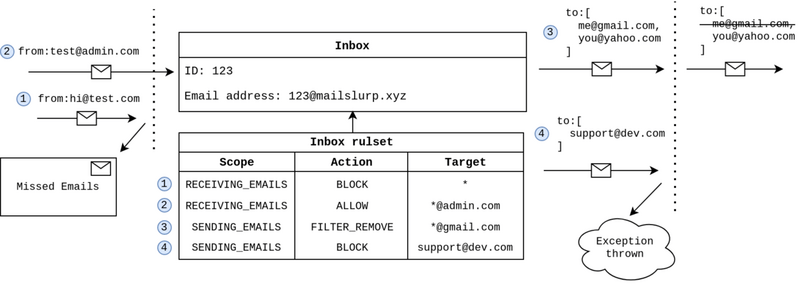
test("inbox ruleset block sending and throw", async () => {
  const mailslurp = new MailSlurp({ apiKey: process.env.API_KEY! });
  // create two inboxes for testing
  const inbox1 = await mailslurp.inboxController.createInboxWithDefaults();
  const inbox2 = await mailslurp.inboxController.createInboxWithDefaults();

  // can send with no ruleset
  await mailslurp.inboxController.sendEmailAndConfirm({
    inboxId: inbox2.id!,
    sendEmailOptions: { to: [inbox1.emailAddress!], subject: "Before block" },
  });
  const [received] = await mailslurp.waitController.waitForMatchingEmails({
    matchOptions: {
      matches: [
        {
          field: MatchOptionFieldEnum.FROM,
          should: MatchOptionShouldEnum.CONTAIN,
          value: inbox2.emailAddress,
        },
      ],
    },
    count: 1,
    inboxId: inbox1.id!,
    timeout: 60000,
  });
  expect(received.subject).toContain("Before block");

  // now create sending block for all domains
  const rulesetSendBlock = await mailslurp.rulesetController.createNewRuleset({
    inboxId: inbox1.id,
    createRulesetOptions: {
      action: CreateRulesetOptionsActionEnum.BLOCK,
      scope: CreateRulesetOptionsScopeEnum.SENDING_EMAILS,
      target: "*",
    },
  });

  // sending throws an exception for inbox2 recipient
  try {
    await mailslurp.inboxController.sendEmailAndConfirmRaw({
      inboxId: inbox1.id!,
      sendEmailOptions: {
        to: [inbox2.emailAddress!],
        subject: "Can't email inbox2",
      },
    });
  } catch (e: any) {
    expect(e.status).toEqual(400);
    expect(await e.text()).toContain("Inbox ruleset prevents sending");
  }

  // can test ruleset using the test endpoint to find out why blocked
  const testResult = await mailslurp.rulesetController.testInboxRulesetsForInbox({
    inboxId: inbox1.id!,
    rulesetTestOptions: {
      testTarget: inbox2.emailAddress!,
    },
  });
  expect(testResult.matches).toBeTruthy();
  // our sending block rule matches
  expect(Object.keys(testResult.rulesetMatches!)).toContain(rulesetSendBlock.id);
  expect(testResult.rulesetMatches![rulesetSendBlock.id]!).toEqual(true);

  // add an allow rule for inbox2's email address
  const sendingEmailsAllowRule = await mailslurp.rulesetController.createNewRuleset({
    inboxId: inbox1.id,
    createRulesetOptions: {
      action: CreateRulesetOptionsActionEnum.ALLOW,
      scope: CreateRulesetOptionsScopeEnum.SENDING_EMAILS,
      target: inbox2.emailAddress,
    },
  });

  // test that our new rule allows sending
  const testResult2 = await mailslurp.rulesetController.testInboxRulesetsForInbox({
    inboxId: inbox1.id!,
    rulesetTestOptions: {
      testTarget: inbox2.emailAddress!,
    },
  });
  expect(testResult2.rulesetMatches![rulesetSendBlock.id]!).toEqual(true);
  expect(testResult2.rulesetMatches![sendingEmailsAllowRule.id]!).toEqual(true);

  // now can send to inbox 2
  const sendRaw = await mailslurp.inboxController.sendEmailAndConfirmRaw({
    inboxId: inbox1.id!,
    sendEmailOptions: {
      to: [inbox2.emailAddress!],
      subject: "Hi inbox2",
    },
  });
  expect(sendRaw.raw.ok).toBeTruthy();
});
Use this for:
- sender or domain suppression
- environment safety boundaries
- compliance-aware traffic restrictions
See the ruleset guide.
Recommended composition pattern
- Evaluate policy first with rulesets.
- Route approved traffic with forwarders.
- Apply aliases where external identity masking is required.
- Send unmatched traffic to a monitored fallback lane.
Anti-patterns to avoid
- using aliases as a substitute for policy enforcement
- combining unrelated forwarding objectives in one rule
- dropping unmatched traffic without a quarantine path
- changing mechanism behavior without staged regression tests
For teams hardening release workflows, pair this model with Email integration testing and Testing webhooks.